Talk about SyMenu or post suggestions, requests, or how-to questions
How to launch a CMD shell into a specific director
|
M4verick Posts: 3
27/12/2025
|
Hi, I'm a new user of SyMenu.
I wish to launch Windows Command shell into a specific directory. In another words, when I launch the command shell, I need the command prompt to already be at the following folder:
"C:\folder 1\folder 2"
I know how to configure SyMenu so that the command shell is launched but I'm at a loss on how to do this.
|
|
|
link
|
|
M4verick Posts: 3
28/12/2025
|
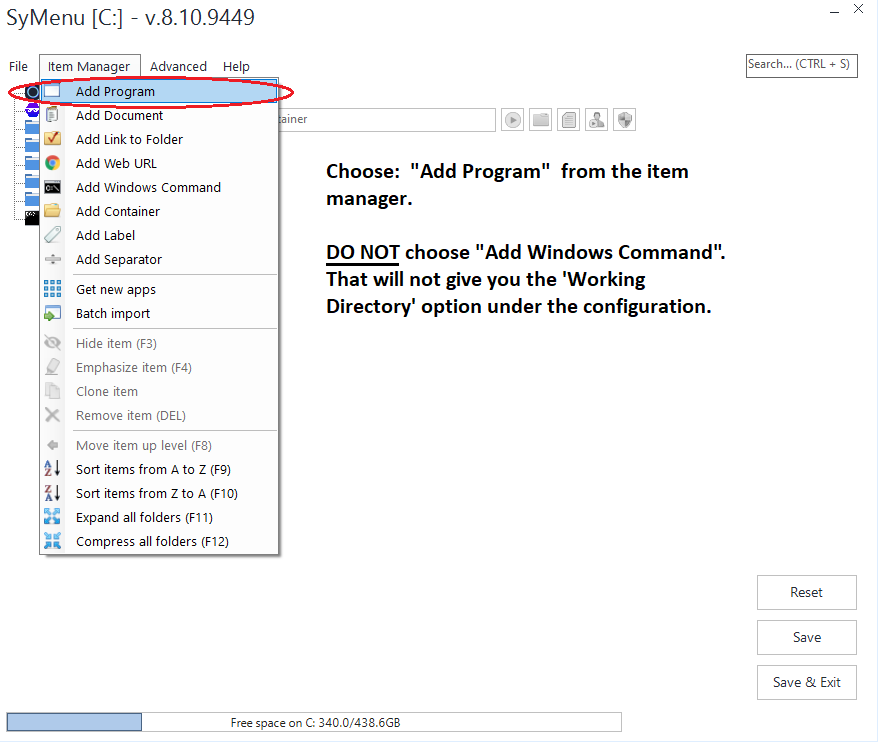
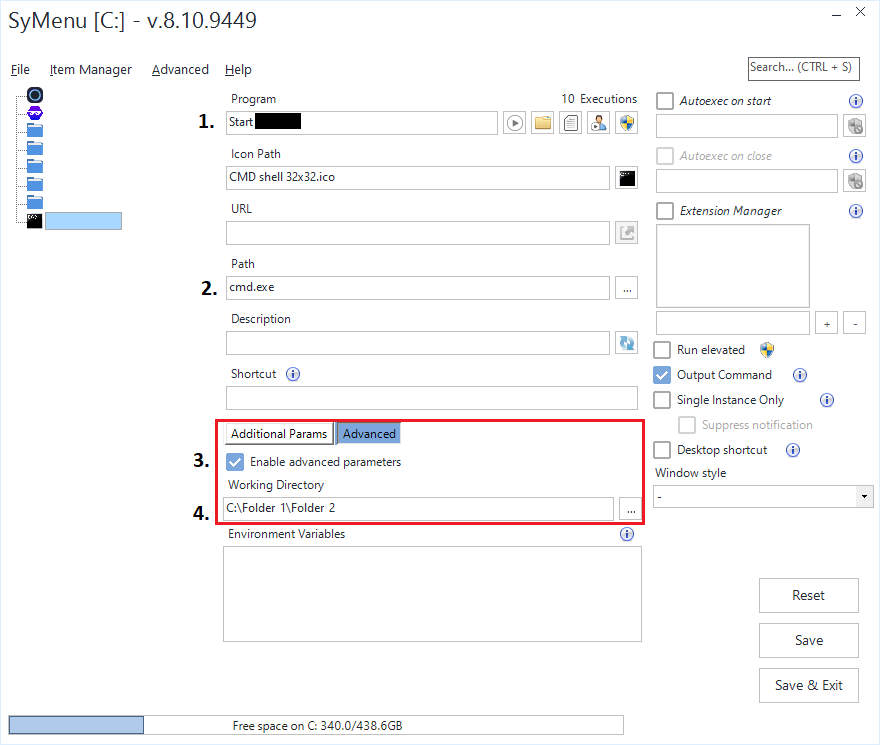
I figured this out on my own. First of all, do not choose "Add Windows Command" - that doesn't give you any option to set a working directory. Instead choose "Add a Program". Afterwards refer to the 2nd screenshot steps 1-4 below.
edited by M4verick on 28/12/2025
|
|
|
link
|
|
Gianluca Administrator Posts: 1381
29/12/2025
|
Nice solution, M4verick.
I just want to add my two cents to show that it was also possible to solve the problem using a Windows Command item.
Add a new Windows Command item and fill the Command field with:
start cmd /k "cd /d D:\Misc\Down" && exit
Naturally, replace D:\Misc\Down with your own folder.
|
|
|
link
|
|
M4verick Posts: 3
30/12/2025
|
Gianluca wrote:
Nice solution, M4verick.
I just want to add my two cents to show that it was also possible to solve the problem using a Windows Command item.
Add a new Windows Command item and fill the Command field with:
start cmd /k "cd /d D:\Misc\Down" && exit
Naturally, replace D:\Misc\Down with your own folder.
Ah, I see. I did play around with that option but I couldn't make it work because I had the quotation marks wrapped around the path like so:
start cmd /k cd /d "D:\Misc\Down"
Thanks for posting the solution!
By the way, why do you need two '&' to make this work? && exit
edited by M4verick on 30/12/2025
|
|
|
link
|
|
Gianluca Administrator Posts: 1381
30/12/2025
|
The single & is needed because otherwise the command interpreter treats exit as an argument of the first command (cd).
The double && is needed because I want exit to run only if the first command has completed successfully.
The second exit command is there to prevent the first window (the launcher), opened by SyMenu in its own folder, from staying open.
It’s the dear old batch syntax man 
|
|
|
link
|